Caching Strategies and Patterns
Caching is fast.
With an in-memory system optimized for key-value access, you can get sub-millisecond p99 response times as measured by the client. That's fast. And because it's so fast …
Caching is fun.
Nobody likes a slow website. Slow websites lead to bored users and lost sales. Developers don't want to work on a slow website or deal with unhappy users. Caching can help your slow website by lowering the latency of complicated requests or reducing the load on your database. But you need to be careful when caching, because …
Caching can be a footgun.
There are effective ways to add caching, and there are ineffective ways to add caching. But even worse than ineffective caching strategies are harmful caching strategies -- ones that confuse your users via stale, inconsistent data or that reduce your application availability.
There are many different ways to implement a cache, and the caching strategy for your application will depend on a number of factors.
In this post, you will learn how to design a caching strategy that works for your application. First, we'll look at the different choices you need to make when designing a caching strategy. Then, we'll review some common caching strategies and when you should use or avoid specific strategies.
Caching choices
Before we discuss specific caching patterns you may use in your application, let's discuss some of the key choices you'll need to make when adding caching to your application.
The three main choices are:
Where to cache -- local vs. remote;
When to cache -- read vs. write;
How to cache -- inline vs. aside.
Let's discuss each of these in order.
Where to cache -- local vs. remote caching
The first caching choice you need to make is on where to cache your data.
In thinking about caching, we often jump to a centralized, remote cache that is used like a faster, less durable version of our database. But a cache need not be a separate piece of infrastructure. You can add caching locally to your application, whether on your backend servers or even on your users' browsers. When we say 'local' caching, we mean caching that is local to some compute and that is inaccessible from other compute instances.
In general, the question of a local vs. remote cache comes down to utility vs. simplicity. A local cache is usually easier to add to an application than pulling in a new piece of infrastructure. Additionally, a new piece of infrastructure brings additional challenges around availability and application uptime that a local cache will generally avoid.
On the other hand, a local cache is less useful than a centralized cache. If you are caching on your backend servers, the chance that a request will be served by a machine that has previously cached the data is reduced as the size of your fleet increases. This is even more true due to the ephemerality of modern cloud-based applications. Serverless functions, containers, or instances are becoming more and more short-lived as applications scale up and down dynamically to match demand. A fresh instance of your application has no local cache and thus has no benefit for the initial requests to the application.
Finally, a local cache can make it harder to manage stale data. When data is altered or deleted, it is easier to make a corresponding update to the cached data in a centralized, remote cache. It is more difficult to indicate updates to cached data that are distributed on local application instances or client browsers. Because of this, a local cache may only work for certain types of cached data or with low time-to-live (TTL) configurations.
A remote, centralized cache does not have these downsides. It can be used by any servers that are handling a piece of work, making it more broadly useful for your application. Further, remote caches generally have mechanisms to expire data on-demand, allowing your write path to purge data after it has been altered. The downsides of a remote cache are centered on the operational challenges of maintaining a separate piece of infrastructure.
When to cache -- read vs. write caching
The second caching choice to consider is when to cache the data. Again, you have two choices -- cache the data when it is read the first time (often called "lazy-loading"), or cache the data when it is written.
The most popular caching pattern is likely the read-aside pattern (TODO: link to later in article). For this pattern, your application first attempts to read and return data from the cache on a request. If the data is not currently in the cache, the application falls back to the database to read the data. It then stores it in the cache before returning the response so that the retrieved data is available for the next request that needs this data.
The opposite pattern is to load your cache following a successful write. After a write succeeds, you would proactively push it to the cache in anticipation of imminent use.
The benefits of caching data when it is read are its flexibility and space efficiency. Lazy loading is a flexible pattern that can work for almost any dataset. You can use it to cache individual objects, a result set of multiple objects, or an aggregated value. Whether caching results directly from a database or some results after computation, read-aside caching is easy to implement as you simply cache the final response before returning to the client.
This is more difficult when proactively caching on the write side. While caching individual items on writes can be straightforward, it is more difficult to proactively cache result sets or aggregated values as it requires a deeper knowledge of what the read patterns are and how those patterns are affected by writes.
Additionally, lazy loading is a more space efficient use of your cache. Rather than loading data into your cache at write time, regardless of whether it will be read again, you are only caching data once it is read. In many applications, reads of individual data are correlated across time. Something that is read once is more likely to be read soon after. By only caching data once it has been requested at least once, you are optimizing for caching more frequently accessed data.
The downsides of caching data when it is read are the slowness of the initial read along with the possibility of returning stale data. Because you are only loading the cache once data is read, it means that each piece of requested data will need to make at least one request through the slower, non-cached path. Depending on your application needs, this may be suboptimal.
Further, a pattern that only caches data on the read side will be subject to returning stale data to clients. If the underlying data has changed without a corresponding eviction of the cached data, users could see confusing results. Applications can mitigate this by caching data for a shorter time, though that exacerbates the downside noted above where there is a cache miss.
How to cache -- inline vs. aside caching
The final consideration in choosing your caching strategy is whether to use an inline cache or a side cache.
In the previous section, we talked about a read-aside cache. An aside cache is the most straightforward type of remote cache, where it stores data explicitly given to it by your service. It usually has simple get & set semantics that can flexibly store any piece of data that you want, but you must store that data specifically. If the data does not exist in the cache, your service is responsible for finding the underlying data elsewhere and updating the cache, if desired.
On the other hand, an inline cache is one that is transparent to your service that is calling to retrieve the data. Your application will hit the inline cache directly to retrieve the item. If the cache does not have the requested data, the cache itself will do the work to fetch the data from the upstream data source.
You can see why these caches get the name from the architecture diagrams below. The aside cache sits aside your application and is called separately from your data source. Alternatively, the inline cache is used inline with your request to the data source.
Aside caches are more common due to their flexibility for nearly any use case. Additionally, they are decoupled from your end datastore and allow you to choose how to handle failures at the caching layer.
The benefit of an inline cache is simplicity within your application. Your application doesn't need to worry about multiple different stores and the corresponding logic to fallback to a database in the event of a cache miss.
The downside of an inline cache is the reduced availability for your application. You're adding in an additional piece of infrastructure that not only adds caching functionality but also takes responsibility for talking to your database. If your cache goes down, you may have trouble falling back to your database as the cache itself was talking to your database.
Another downside of the inline cache is the availability of such services. An inline cache has a tight integration with the downstream data source that it is fronting. As such, someone needs to specifically build a cache that integrates with the primary data source. Because of this, inline caches are generally reserved for generic protocols or as proprietary add-ons to a specific database.
Common caching strategies
Now that we know the key choices you need to make when implementing a caching strategy, let's review some popular caching patterns. For each pattern, we will describe the pattern, the choices the pattern makes on the three questions above, and when you may want to use that pattern.
Local browser caching
The first, and perhaps simplest, caching strategy is local browser caching. If you are building a web-based application accessed from a browser, you can use local storage to store key-value data in the user's browser. For example, once a user authenticates to your service, you may store some information about the user's ID and profile used to access the service to speed display of your application upon subsequent viewings.

Local browser caching is local, aside caching and is likely written at read-time.
The benefits of local browser caching are its simplicity, as the local storage API is included in modern web browsers. Additionally, you don't need to worry about provisioning a cache in advance or running out of space, as you're effectively renting out space on your user's machine to cache this data.
The downsides of local browser caching is that it's only useful in specific circumstances. If a user reuses a browser, you can speed up certain operations easily. However, the cached data does not apply to the user when using a different device or even using a different browser instance on the device. Further, there's no mechanism for your backend data source to proactively invalidate items in the local storage cache if the underlying data has changed.
Local backend caching
A second caching strategy is another local strategy. With local backend caching, your backend server instances may cache network responses or intermediate data from other systems. This data is often cached in-memory within your application process, such as with key-value maps in your programming language. When your backend instance needs to access that data, it will first check the in-memory object, then fall back to the primary data source if the cached value is not present.
Like local browser caching, this is a local, aside caching strategy that is likely written at read-time.
The benefits of this strategy are in its ease of use and simplicity. If you have data that is frequently accessed and relatively long-lived, you can quickly cache it on individual server instances without standing up and operating additional infrastructure. This can work well for configuration data or other slow-moving data.
In a way, this is similar to the way we reuse (or "cache") our Momento SimpleClient within AWS Lambda to enable connection reuse! (TODO LINK).
The downside of this caching strategy is that it is less effective than remote caching methods. Each backend instance will have its own independent cache. If you have a broad set of data to cache, and you only cache it once it has been requested once on that instance, your cache hit rate can be quite low. Further, the cache hit rate gets even lower as your cluster size (and, likely, your overall load) increases! This is particularly troublesome when caching with hyper-ephemeral compute like AWS Lambda where your instances can be created and destroyed regularly. Finally, like with local browser caching, it can be difficult to invalidate expired data on the backend instances if the underlying data changes.
Read-aside caching
The third, and most common, caching strategy is read-aside caching (commonly called "lazy loading"). With read-aside caching, your application will first try to request your needed data from a cache. If the data is there, it will return to the caller. If not, it will request the data from the primary data source. Then, it will store the data in the cache for the next attempt and return the data to the caller.
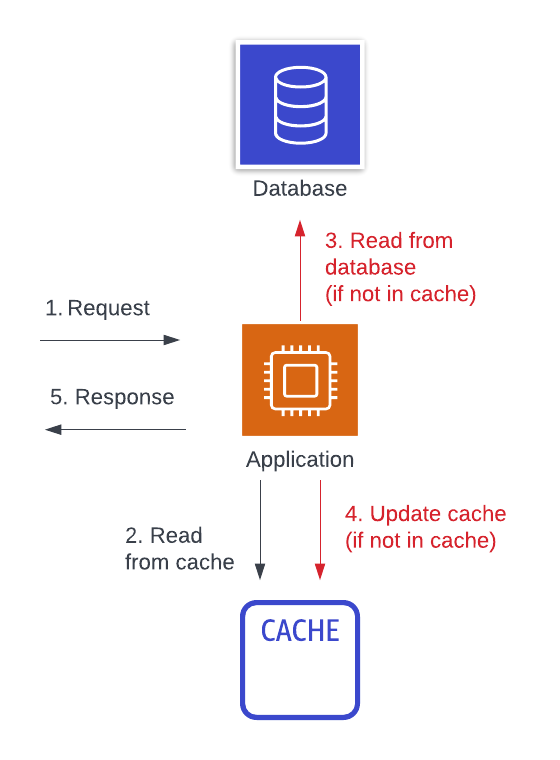
This is a remote, read-based, aside caching strategy.
The benefits of a read-aside caching strategy are in the improved cache hit rate and in the general applicability to most problems. For most access patterns, a piece of data that is accessed once is more likely to be accessed again soon after. By caching a piece of data in a centralized location after it has been read, we can improve the cache hit rate across our fleet of servers. Further, the read-aside cache strategy applies to nearly any situation. You can cache at any point in your application that makes sense -- a network response, after some intermediate calculation, or full, aggregated responses to an HTTP client.
Moving from local to remote caching will increase our hit rate, but it will also increase our operations burden and application complexity. We have an additional piece of infrastructure to manage and must consider its effect on overall system availability. You may think availability won't be affected because it falls back to a primary data source, but many outages are due to an initial cache failure leading to unsustainable load on a primary data source.
Additionally, the read-aside cache does pay a latency cost for the initial read of a piece of data. If your application reads are spread across records in your application, you might have a nearly full cache along with a low cache hit rate overall.
Write-aside caching
The next caching strategy is similar to the previous. With write-aside caching, we are using a centralized, aside cache like with read-aside caching. However, rather than lazily loading items into our cache after accessing it for the first time, we are proactively pushing data to our cache when we write it.
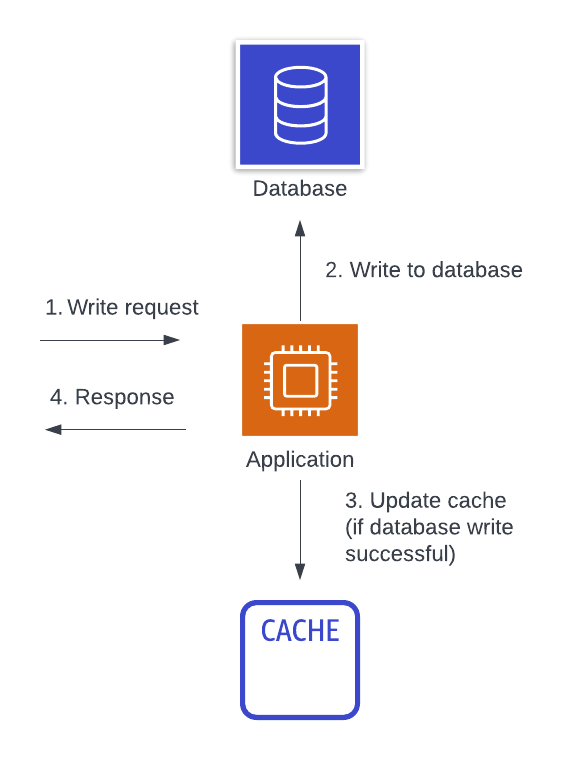
This is a remote, write-based, aside caching strategy.
Many of the benefits of the write-aside caching strategy are similar to the read-aside caching strategy. You should have a higher cache hit rate with a centralized cache. Further, your cache hit rate should be even higher as you won't have the initial miss for each entry. This can reduce latency for data that you know will be accessed soon after it is written. Finally, when implemented correctly, you can reduce the chance of stale data as all data updates are immediately reflected into the cache.
The downsides of the write-aside strategy are in its added complexity. Read-aside caching is straight-forward in how it is implemented within a single data access path. With write-aside caching, you need your read and write paths to work together to understand the cache key and value format. Further, you need a deeper understanding of both your read and write access patterns. This can require careful auditing and constant vigilance to prevent stale data across patterns.
Read-through and write-through caching
The final two strategies are read-through and write-through caching. These two strategies are unique in that all data access goes through the cache directly. Your application will make a request to the cache to fetch the requested data. If the data is available locally, the cache will return it. Otherwise, the cache itself will do the work to fetch the data from the primary data source, cache the data, and return it to you.
For example, the image below shows the flow for a write-through cache. First, a write request comes to our application. The application writes the data directly to the cache, and the cache is responsible for persisting it back to the main database. Once the cache returns to the application indicating that the write is persisted, then the application returns a response.
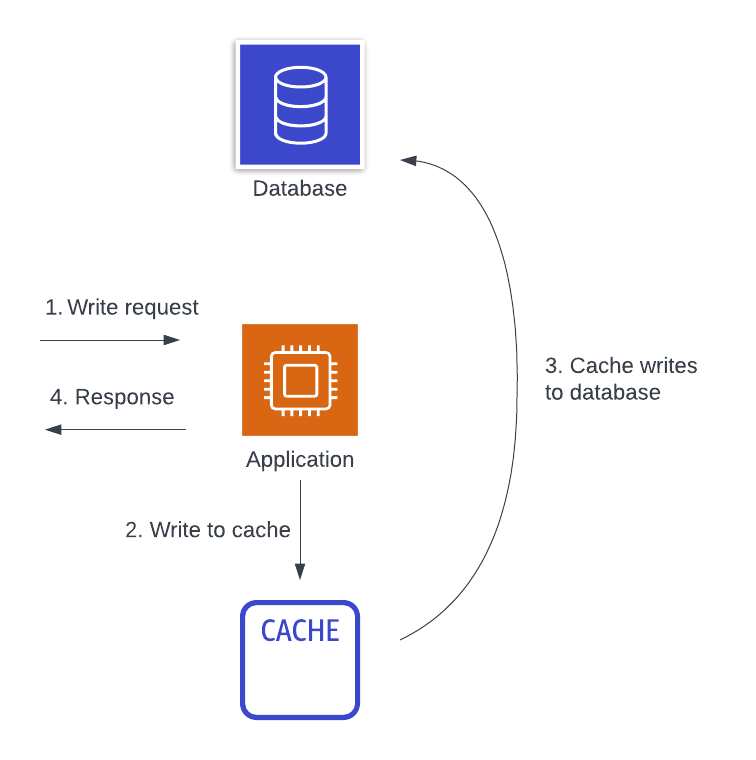
This is a remote, inline caching strategy that can be used on either the read side or the write side.
A content delivery network (CDN) is a type of read-through cache, as you can see in the image below.
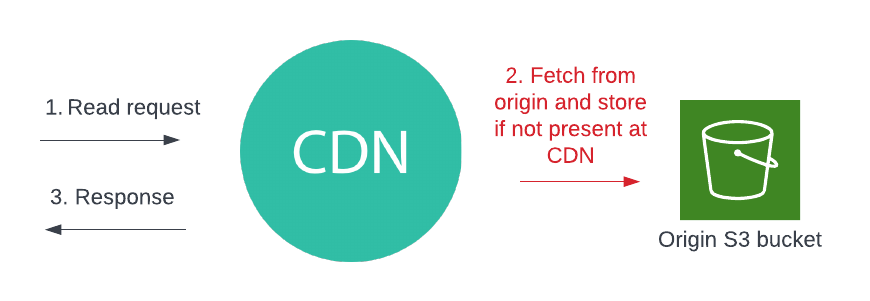
A client may make an HTTP request for a piece of content, and the CDN will serve it from an edge location if available or make a trip back to the origin if not. If the CDN retrieves it from the origin, then it will store it on the edge for subsequent requests. There are also a few other HTTP-based read-through caches, such as Varnish or even Nginx.
Database-based inline caches are more rare, but they do exist. DynamoDB Accelerator (DAX) is a read- and write-through cache for DynamoDB. You can perform the same DynamoDB operations against DAX as against your DynamoDB table, and your DAX instance will forward reads and writes to the underlying DynamoDB table as needed.
The benefits of an inline cache are in their simplicity from a client perspective. You don't need to manage cache keys or implement multi-step logic to handle cache misses. The inline cache handles this for you. Additionally, because it is a remote cache, it gets the benefits of a higher cache hit rate that we saw from aside caches.
Inline caches have downsides as well. First, inline caches for your data source can be hard to find or non-existent. The creator of an inline cache needs to implement the logic to handle fallback to the underlying data source. Depending on the implementation, there can be discrepancies in how your application works with and without the inline cache. Further, using an inline cache adds a critical piece of infrastructure to your application and can affect availability even more than an aside cache.
Conclusion
In this document, we learned about caching strategies. First, we reviewed the key decisions to make in choosing a caching strategy. We discussed the pros and cons of each option to make your decision easier. Then, we reviewed some common caching strategies. For each strategy, we discussed the choices they made on each of the three key decisions, as well as the benefits and downsides of each strategy.