Momento Concepts
On this page, you will learn about the concepts specific to using Momento in your application. These concepts apply across languages -- while Momento has supported SDKs for Golang, JavaScript, Python, Java, and .NET, the concepts described on this page are applicable to all of them.
In crafting Momento, we've focused on two things: simplicity and speed. Every decision we make is in service of these two goals. In describing the Momento concepts below, we will also explain how these concepts make it easier or faster for you as a Momento user.
On this page, we'll cover three main aspects of working with Momento:
The SimpleCache Object
In every Momento SDK, you will be using a SimpleCache client object to interact with the Momento service. The SimpleCache object will provide credential management and efficient interaction with the Momento API.
Generally, you will create a SimpleCache object by passing in your authentication token and any desired settings.
For example, you can create a SimpleCache object in Python with the following code:
import os
import momento.simple_cache_client as simple_cache_client

MOMENTO_AUTH_TOKEN = os.getenv('MOMENTO_AUTH_TOKEN')
DEFAULT_TTL_SECONDS = 60

cache_client = simple_cache_client.init(MOMENTO_AUTH_TOKEN, DEFAULT_TTL_SECONDS)
Or, if you're working with Golang, you can create a SimpleCache struct instance with the following code:
package main

import (
  "os"

  "github.com/momentohq/client-sdk-go/momento"
)

func main() {
  var authToken = os.Getenv("MOMENTO_AUTH_TOKEN")
  const itemDefaultTtlSeconds = 60

  client, err := momento.NewSimpleCacheClient(authToken, itemDefaultTtlSeconds)
}
A SimpleCache instance can interact with both the control plane and data plane APIs in Momento. Let's take a look at each of these.
Control plane: simple, efficient cache management
The Momento control plane API is the API you will use to manage your caches overall. You can use the control plane API to create a new cache, list existing caches, or delete an unwanted cache.
When you hear 'control plane', you might think 'slow, management operations.' But that's not the case here -- Momento has been designed to quickly and efficiently manage caches within your account. You won't fire a command to create a cache and wait for the cache to be created in the background. With Momento, the cache is created synchronously, within a second. Your cache will be ready to go by the time your request to create it has returned.
Each cache in Momento is isolated from other caches, and there's no limit on the number of caches you can create in your account. This means you can have dedicated caches for each environment for your application or even each deployed branch in your CI/CD system.
Data plane: performant cache interactions
The Momento control plane is nice, but the data plane is where the action is. The data plane API refers to operations that actually interact with the contents of your cache. It's designed to be blazing fast -- most data plane operations take less than 1-2 milliseconds from the client's perspective.
The data plane includes the standard "set" and "get" cache functionality allowing you to write and retrieve a cache entry. You can also use the multi-get and multi-set commands to process multiple cached entries in a single request.
Interacting with the Momento API
The SimpleCache object will be your main way of interacting with the Momento API. Let's talk a little bit about what is happening under the hood. We'll discuss the authentication mechanism, the communication format, and the networking configuration for the Momento API.
Authentication token
Your SimpleCache object will use an authentication token when communicating with the Momento service. This token is a JSON Web Token (or "JWT") that contains signed account information to authenticate you when making cache requests. It also includes information like the hostname of your cache instance, which helps the SimpleCache object to make more efficient requests to the Momento service.
You will receive the Momento authentication token when signing up for the Momento service. To get your Momento authentication token and begin using the Momento service, follow the quickstart here.
gRPC
Momento is a remote cache using a client-server model. Because of this, your SimpleCache client will need to communicate with your remote Momento cache. To facilitate this communication, Momento could use any number of communication methods, from a JSON API over HTTP to a custom-built RPC protocol.
The SimpleCache client object uses gRPC to communicate with the Momento service. gRPC is a popular open source remote procedure call (RPC) framework developed at Google for fast, efficient communication. When using gRPC, you define the RPCs you want to expose and the data structures you will use in a .proto file. This .proto file is then used to build the client and server implementations of your service.
There are two main benefits for you of using gRPC as a Momento user.
First, gRPC is fast. You may be familiar with using JSON-based REST APIs for interacting with other services. While this method is flexible, the plaintext format of the message results in a larger message size and slower performance. Conversely, gRPC uses protocol buffers by default to exchange messages between the client and server. Protocol buffers will serialize your data into a more efficient binary format, allowing for faster transport plus faster serialization and deserialization of your data. When you are using a cache like Momento, this additional speed is critical.
Second, gRPC has cross-language support. You can use the .proto files to quickly generate clients in a large number of supported languages. While this doesn't directly help you as a Momento user, you indirectly benefit by quickly receiving new features in your language of choice. The Momento team can generate base clients across languages, lowering the burden of maintaining SDKs for each language. We will craft a consistent, language-specific interface on top of the generated code for each language, but the baseline work of interacting with the Momento service is much lower.
gRPC is supported by all languages for which there is a Momento SDK. For most of these languages, you do not need to know that Momento is using gRPC -- all the dependencies and gRPC communication are handled for you by the Momento SDK. For special concerns about using the Momento Python SDK in AWS Lambda, check out our guide on using Momento in AWS Lambda.
Networking
As noted above, Momento cache is a remote service from your application, and thus we need to think about the networking infrastructure to connect your application to the Momento service. In keeping with our core principles, Momento offers two networking mechanisms for interacting with your cache: the default configuration, and an advanced configuration.
Default networking (public internet + HTTPS)
By default, your SimpleCache client will connect to a publicly accessible endpoint for the Momento cache service. All requests to the Momento service will travel over the public internet to a Momento-managed load balancer, which will route your request to the proper server.
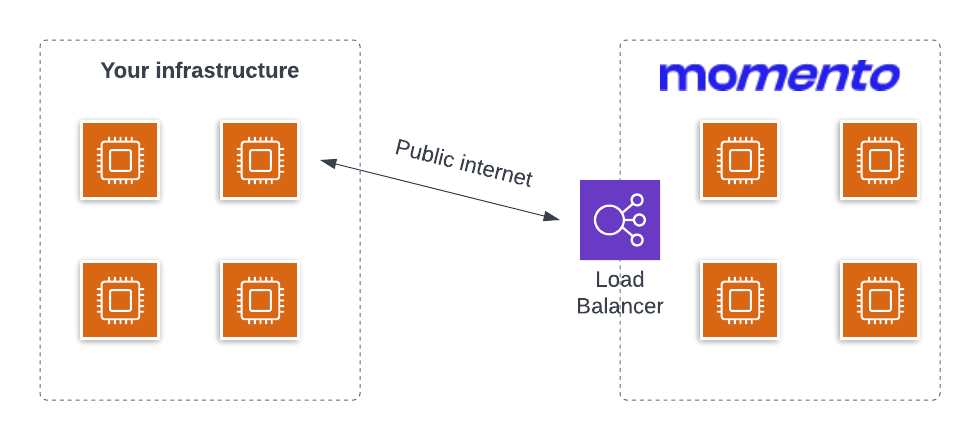
There are two benefits to the default networking setup.
First, it is simple. You can get started with Momento and start interacting with your cache in as little as five minutes. You don't have to mess with complicated network configuration to benefit from a cache in your application.
Second, it works well with serverless applications. Many serverless applications prioritize using services that are available over the public internet using HTTPS. Part of this is due to the initial complexity and latency around using Lambda functions within a VPC, but part of it is due to the reduced complexity of avoiding complex network configurations.
If these benefits appeal to you, the default networking setup is perfect for you.
Advanced networking (VPC peering)
In addition to the default networking setup, Momento provides an advanced networking configuration that allows for VPC peering between your VPC and the Momento VPC. Under this configuration, requests to the Momento service will travel through private infrastructure rather than passing over the public internet.
This is a good option for you if you do not want your data going on the public internet or if you have extreme bandwidth or latency requirements. By using VPC peering, your data stays in private infrastructure the entire time, without traveling over the public internet. Additionally, you can save on bandwidth charges by avoiding egress to the public internet. Finally, requests through a cloud provider's private infrastructure generally have lower latency than those on the public internet.
If you're interested in using VPC peering with your Momento cache, please contact us to learn more.
Time-to-live (TTL)
Time-to-live ("TTL") is an important concept in caching. We will first discuss what it is and why it's important in caching. Then, we will show how Momento uses TTL.
What is TTL?
Just like the name suggests, the TTL attribute tells the cache how long an entry should live in the cache. When inserting an item into a cache, you include a TTL attribute with a number of seconds indicating when the item should be evicted. When the TTL has passed, the cache will remove the item from your cache.
Why do caches need TTL?
Usually, a cache entry is not the definitive source of a piece of data. Rather, a cache entry is a faster, cheaper, and less durable way to store a piece of data, whether it's an individual record from a different database, some aggregated or computed information from multiple records or sources, or even a resource from an external, third-party application. Using a cache helps to improve latency or reduce load on a dependency in our application. In using a cache, we're anticipating that our cache entry will be requested by another client soon.
And yet, most caches don't hold onto all of their entries forever. Partly, this is a function of data staleness. The data you have stored in a cache entry may be changed over time, in which case you want a client to retrieve something fresher than the cached entry. If you have strict requirements around data consistency, you may need to directly update or remove a cache entry whenever its underlying data changes. In other situations, you may be fine serving potentially stale data for a time, while still expiring it regularly to ensure some amount of freshness.
A second consideration is simple resource constraints. Caches usually hold their data in RAM, and RAM is a scarce resource. If you never expire entries from your cache, you may find your RAM full when you try to cache new items. Your cache could reject the new entry or, more likely, choose to evict items based on a predetermined eviction algorithm.
Most caches were built for a pre-cloud world and thus require you to pre-provision specific amounts of memory available for your cache. For these caches, proper TTL management is critical as overfilling your cache can result in availability issues or cache evictions in ways you don't prefer.
In contrast, Momento is designed for the elasticity of the modern cloud. You don't need to pre-provision your cache size -- your Momento cache automatically expands and contracts based on the operations you perform against it. In the normal course of operations, Momento will not evict items based on a lack of available memory.
That being said, you should still use TTL on items in your Momento cache to avoid cache staleness and to reduce costs. Let's see how to use TTL with Momento's SimpleCache.
Using TTL with SimpleCache
Now that we know what a TTL is and why you use it with caching, let's see how to use it with Momento.
First, when creating a SimpleCache client with the Momento SDK, you must provide a default TTL value that will be applied to all items.
Notice that in both of the SimpleCache examples above, we're passing in a default TTL value to the constructor. This default value will be applied on all set and multi-set operations using the SimpleCache object.
You can also choose to override the default TTL on any single operation with your SimpleCache object. This can allow for different TTL policies for different objects in your application or even fine-grained TTL configuration for individual items.
To set a custom TTL value in a set operation using Momento's Python SDK, use code similar to the following:
cache_client.set("users-cache", "foo", "123", 100)
In this operation, we are setting the cache entry identified by the key of "foo" to the value of "123" within the "users-cache" in our Momento account. For this important value, we've decided it should be cached for 100 seconds rather than the default of 60 seconds.
If you have cache entries that you would not like to expire or that you only plan to expire explicitly, you can indicate so by using a TTL value of "0":
cache_client.set("users-cache", "bar", "456", 0)
By setting the TTL value to "0", you have told Momento that the "bar" cache entry should not be removed from the cache.
Conclusion
On this page, we learned the basic concepts of working with the Momento SDK and API. If you want to get started using Momento, check out our getting started guide.
If you want to learn more about caching strategies and how to think about caching, check out our resource on caching strategies and patterns.
If you're looking for a deep, walkthrough tutorial, take a look at our tutorial on adding caching to a serverless application.